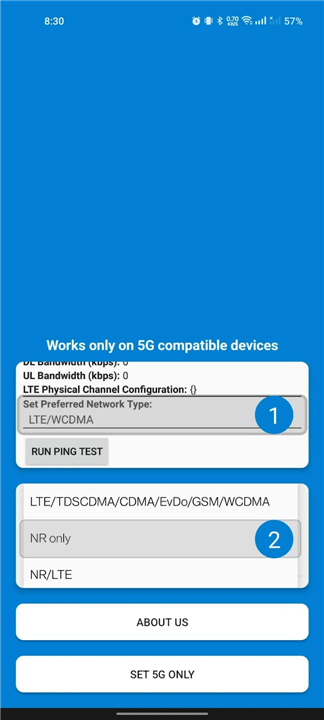
5G Only Network Mode
Overview
• Modern smartphones are designed to automatically switch between network bands to maintain a stable connection.
• However, this often results in the device defaulting to slower or less stable bands, even when a superior signal is available.
• This application empowers you to take manual control of your mobile device’s network configuration, unlocking hidden settings typically restricted by manufacturers.
Unrestricted Network Access
• Many advanced network modes are built into your device’s hardware but are hidden by the operating system for simplicity.
• This application provides a direct gateway to these restricted settings, allowing you to force your device to prioritize specific technologies.
• Supported modes include:
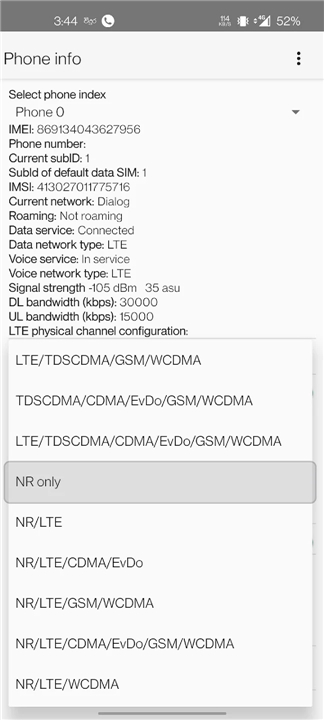
+ NR Only (5G): Forces the device to connect exclusively to 5G infrastructure for maximum speeds.
+ LTE Only (4G): Locks the connection to 4G, preventing the phone from dropping to slower 3G or 2G bands.
+ WCDMA Only: Restricts the device to 3G connectivity.
+ GSM Only: Limits the device to 2G connectivity for legacy network compatibility.
Simple Operation
• You no longer need to navigate through complex developer menus or root your device to manage your connectivity.
• The application is designed for ease of use:
+ Launch the application directly from your home screen.
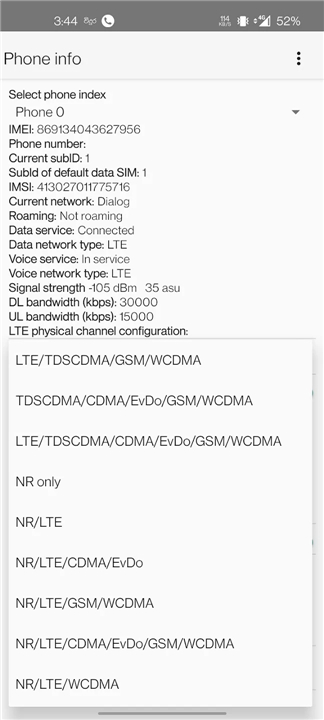
+ Select the hidden network settings menu provided within the interface.
+ Choose your preferred network type from the comprehensive list.
+ Apply the changes to lock your device into the selected band immediately.
Why Use This Application
• By forcing a specific network mode—such as 5G Only—you can prevent your phone from frequently searching for and switching between towers, which can often drain battery life or cause unstable internet speeds in areas with fluctuating signal strength.
• Whether you are in a crowded area where 4G is congested or seeking the lowest latency possible with 5G, this tool gives you the autonomy to optimize your mobile experience.
FAQ
Q: Why does my phone automatically switch between network bands?
A: Modern smartphones are programmed to scan and switch between available bands to prioritize a stable connection, but this often leads the device to drop down to slower, more congested bands even when a faster signal could potentially be maintained.
Q: Does this application require me to root my device?
A: No, one of the primary benefits of this tool is that it provides access to restricted network settings without requiring you to root your phone or navigate through complicated developer menus.
Q: What does "NR Only" mean in the network settings?
A: NR stands for New Radio, which is the industry standard for 5G technology. Selecting "NR Only" forces your device to connect exclusively to 5G infrastructure, ensuring you get the maximum possible speed and lowest latency available from your carrier.
Version History
v1.4.0——2 Jun 2026
Change your network mode to 5G only (NR only) Download the latest version of 5G Only Network Mode to enjoy new features and updates immediately!
*1.4.0
Added more bugs to fix later
*1.3.0
Added more bugs to fix later
*1.2.0
Added more bugs to fix later