Launcher314
The Vision Behind Launcher314
• Launcher314 was born from a desire for digital sovereignty and simplicity.
• Originally created to support a transition to a more secure operating system, this project evolved into a tool for anyone who believes personalizing a phone should be a joy, not a chore.
• It eliminates the frustrating scavenger hunt for basic settings, offering a streamlined experience that respects both your time and your intelligence.
Uncompromising Privacy and Security
In an era of constant data harvesting, Launcher314 stands as a fortress for your personal information.
• All user data is stored strictly on your local device.
• The app requires no internet permissions, ensuring your information never leaves your control.
• There are zero data collection libraries or hidden trackers, a fact you can verify with any security auditing tool.
• As Free and Open Source Software (FOSS) under the GPL-3.0 license, the code is transparent and community-driven.
Intuitive, All-In-One Customization
• Revolutionize your interface without the guesswork.
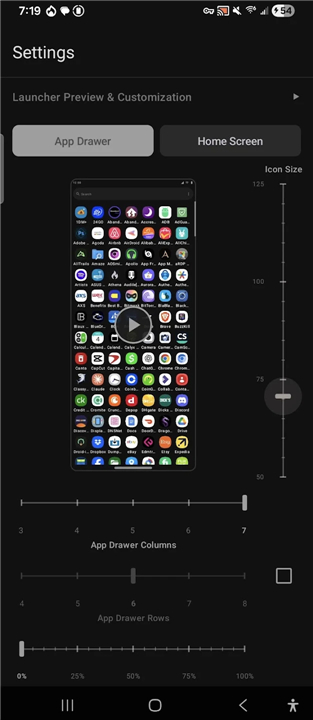
• Launcher314 brings every adjustment to a single, unified screen with live preview windows.
+ View changes in real-time before applying them to your home screen.
+ Set independent row and column counts for your Home Screen and App Drawer.
+ Utilize a universal icon size indicator to ensure a clean layout where text and images never overlap.
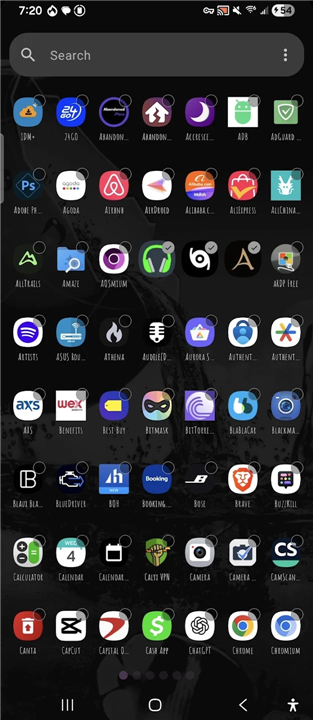
+ Switch instantly between paged and vertical scroll modes in the app drawer.
+ Personalize your aesthetic with a curated selection of popular fonts and adjustable text scaling.
+ Modify navigation indicators and scroll bars to suit your unique style.
Purposeful Design and Accessibility
• This launcher is built for those who want to spend less time in menus and more time using their devices.
• By consolidating settings into a few clear screens, the path from installation to a perfected layout is shorter than ever.
+ High-performance rendering uses bitmaps for icons and folders to keep the interface fluid.
+ The Accessibility Service is used exclusively for the optional double-tap-to-lock gesture.
+ This service never reads screen content or collects sensitive data, and it remains entirely under your control within your device settings.
FAQ
Q: Is my personal data safe when using Launcher314?
A: Absolutely, your security is a foundational pillar of this project. Every single byte of your user data is stored strictly on your local device. There are no external servers harvesting your layout patterns, app usage, or personal preferences, giving you complete peace of mind.
Q: Does Launcher314 have access to the internet?
A: No, Launcher314 does not require any internet permissions whatsoever. Because the app lacks the ability to connect to the web, you can rest assured that your private information never leaves your device.
Q: How can I verify that Launcher314 is actually as secure and private as you say?
A: Launcher314 is published as Free and Open Source Software (FOSS) under the GPL-3.0 license. This means the entire codebase is fully transparent and community-driven. You can easily inspect the code yourself or use any third-party security auditing tool to verify that there are zero hidden trackers or data collection libraries embedded in the app.
Version History
v0.0.22-beta——10 Aug 2026
Just a simple one screen android launcher people can use Download the latest version of Launcher314 to enjoy new features and updates immediately!
*0.0.22-beta
Minor bug fixes and improvements. Install or update to the newest version to check it out!
*0.0.21-beta
Minor bug fixes and improvements. Install or update to the newest version to check it out!
*0.0.20-beta
Minor bug fixes and improvements. Install or update to the newest version to check it out!