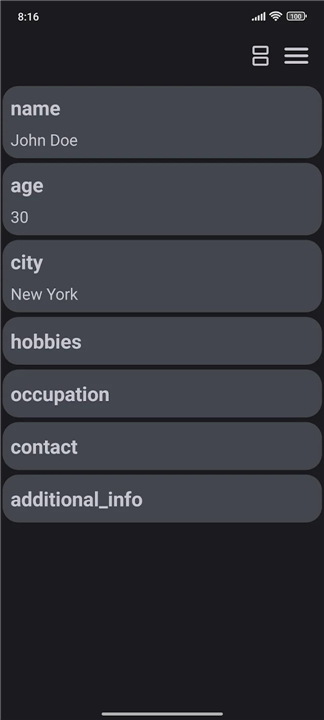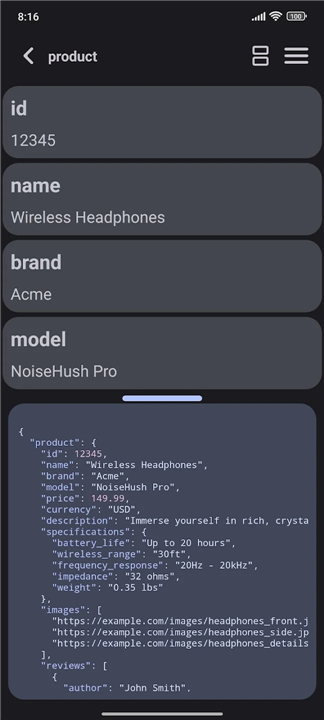
Json List
Overview
• Json List is a comprehensive and lightweight utility designed to streamline the viewing, organization, and management of JSON data.
• It serves as a bridge between complex, raw code and a readable, structured format, making it an essential tool for developers, data analysts, and software testers.
File Management and Accessibility
• Load JSON files directly from local device storage for offline analysis.
• Import remote data by entering a URL, allowing for the immediate inspection of API responses.
• Handle large datasets efficiently without sacrificing application performance or speed.
Advanced Visualization and Navigation
• Convert dense JSON objects into a clean, hierarchical list format that simplifies data interpretation.
• Utilize a robust search engine to locate specific keys, values, or strings within complex nested structures.
• Apply high-speed filters to isolate relevant entries and eliminate unnecessary visual noise during the debugging process.
Interactive Editing and Split-Screen View
• Modify JSON items directly within the list interface to facilitate rapid prototyping and data correction.
• Activate a specialized split-screen mode to view the raw source code and the formatted list side-by-side.
• Ensure data integrity by synchronizing changes between the raw text and the structured list view in real time.
Modern Interface and Customization
• Support for Material You dynamic color themes, which automatically synchronize the application's aesthetic with the operating system's color palette.
• Responsive design that adjusts to various screen sizes, ensuring a consistent user experience on both mobile and desktop environments.
• User-friendly layout optimized for long-term productivity and reduced eye strain during extended data review sessions.
FAQ
Q: Can I use Json List to analyze files stored locally on my device without an internet connection?
A: Yes, the application allows you to load JSON files directly from your local device storage, which is perfect for performing offline analysis. This feature ensures that you can continue your work even when you don't have access to a network.
Q: How does the application handle data coming from live APIs or remote servers?
A: The tool makes it very simple to import remote data by allowing you to enter a specific URL. This is particularly useful for developers who need to immediately inspect and validate API responses in a structured environment without manually downloading the files first.
Q: Will the application experience lag or crashes when I try to open very large datasets?
A: Json List is designed to handle large datasets efficiently, ensuring that performance remains high and the speed of the application is not sacrificed. You can navigate through extensive files without the typical sluggishness associated with less optimized text editors.
Version History
v1.10——28 Jul 2026
previewing JSON from file or url in a user-friendly list format Download the latest version of Json List to enjoy new features and updates immediately!
*1.10
Bugfix
- Fixed app not showing in "Open with..." dialog on some file explorers
New
- Automatically check for update and notify in the app if it has new version
Updates
- UI update for list item for object or array
- Update display name of array
*1.9
Bugfix
- Fixed an issue where overwriting a file could result in invalid JSON
- Fixed bug when large data tries to display in raw JSON View
Optimization
- Working with large data is more faster
New
- Added toggle for scroll animation in settings
Updates
- Update feedback dialog
- Handle numbers with leading zeros as strings
- Improve search UX and UI feedback
*1.8
Bugfix
- correct handling for escape sequences (n, t, r...)
New
- Resizable Split View
- Search
- Release Notes
Updates
- UI Update
- Tool menu
- Progress bar
- Save Button position
- Update edit mode
- Now you can change all key names that has same name in a list at once
- Update animations